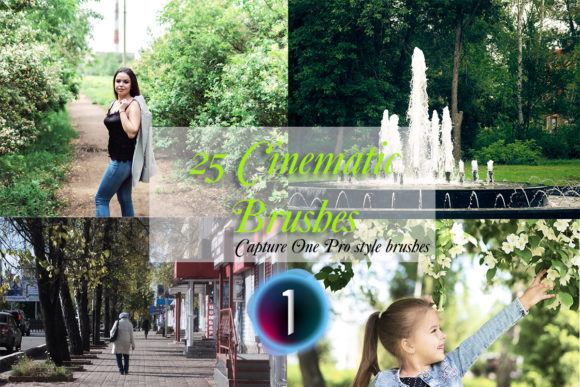
25 Cinematic Capture One Style Brushes
In the evolving landscape of digital photography, post-processing has shifted from a mere corrective step to a fundamental part of the creative narrative. For photographers using Phase One’s powerful software, the introduction of 25 Cinematic Capture One Style Brushes represents a significant leap forward in workflow efficiency and artistic expression. These tools are not just presets; they are dynamic, localized adjustments designed to bring the depth, mood, and color grading of cinema directly into your still images.
The Evolution of Localized Editing
Traditionally, achieving a cinematic look required complex layering in Photoshop or tedious manual masking within raw converters. The 25 Cinematic Capture One Style Brushes streamline this process by leveraging the native power of Capture One Pro 21 (version 14.1.0 or above). By utilizing the .costylebrush format, these brushes allow users to paint specific effects onto an image with precision, offering a level of control that global presets simply cannot match.
The core value proposition here is localization. A cinematic look often relies on directing the viewer’s eye through light and shadow. With these brushes, you can darken the edges of a frame to create a vignette, highlight a subject’s face with a subtle glow, or desaturate background distractions—all while maintaining the natural texture and detail of the original raw file. This approach ensures that the final image feels organic rather than overly processed.
What Is Included in the Package
When you acquire this collection, you are receiving a comprehensive toolkit designed for immediate integration into your workflow. The download includes:
- 25 Instant Download Capture One Pro Style Brushes: Delivered as
.costylebrushfiles within a convenient zip archive. - Installation Guide: A simple text file providing clear instructions on how to import and activate the brushes within your software.
It is crucial to note that these brushes are pre-tested on various photographic styles to ensure consistency. However, they are intended to serve as a basis for your work. The true magic happens when you apply a brush and then make small, personalized adjustments to find the perfect settings for your specific image.
Technical Requirements and Compatibility
Before diving into the creative possibilities, it is essential to address the technical specifications. These brushes are engineered specifically for Phase One Capture One Pro 21 version 14.1.0 or above. Attempting to use them on older versions or incompatible software will result in errors or failed imports.
The compatibility extends across both major operating systems:
- Mac OS: Fully supported for Apple users.
- Windows PC: Fully supported for Windows users.
This cross-platform support ensures that studios and individual creators can maintain a consistent workflow regardless of their hardware preferences. The .costylebrush format is a proprietary container that holds all the adjustment parameters—exposure, contrast, saturation, clarity, and more—allowing for seamless transfer between machines.
Exploring the Cinematic Aesthetic
The term "cinematic" is often overused, but in the context of these 25 Cinematic Capture One Style Brushes, it refers to specific visual characteristics found in motion pictures. These include:
- Teal and Orange Color Grading: A popular contrast scheme that separates skin tones from background elements.
- Muted Tones: Reducing saturation in specific channels to create a moody, atmospheric feel.
- Soft Contrast: Mimicking the dynamic range of high-end cinema cameras.
- Directional Lighting Effects: Simulating light sources that do not exist in the original capture.
Each of the 25 brushes targets one or more of these elements. For instance, one brush might focus solely on cooling down the shadows, while another might add warmth to the mid-tones. By having these distinct tools, photographers can mix and match effects to create a unique signature style.
Real-World Applications
Who benefits most from this collection? The answer spans across various sectors of the photography industry.
Wedding Photographers: Often working in mixed lighting conditions, wedding photographers can use these brushes to unify the color palette of a reception hall or to add a romantic glow to portrait sessions. Instead of spending hours color-correcting each image, a quick application of a cinematic brush can establish a cohesive mood across the entire gallery.
Portrait Artists: For studio and environmental portraits, these brushes allow for subtle skin retouching and background manipulation. You can draw attention to the subject’s eyes by brightening the iris slightly or soften the background to create a shallow depth-of-field effect digitally.
Commercial and Brand Creators: Brands often require a specific aesthetic that aligns with their marketing materials. These brushes provide a quick way to achieve a high-end, editorial look that resonates with modern consumer expectations. Whether it is a fashion shoot or a product lifestyle image, the cinematic touch adds perceived value.
Workflow Integration and Best Practices
To get the most out of the 25 Cinematic Capture One Style Brushes, it is important to integrate them thoughtfully into your editing pipeline. Here is a recommended approach:
- Global Adjustments First: Always start by balancing your exposure, white balance, and base color correction. The brushes work best on a well-exposed raw file.
- Select the Appropriate Brush: Browse the 25 options and choose one that complements the mood you wish to convey. Do not force a brush if it clashes with the natural light of the scene.
- Paint with Precision: Use the brush tool to paint the effect only where needed. Utilize the auto-mask feature if available to help select edges accurately.
- Refine the Opacity: Rarely will you want a brush effect at 100% strength. Lower the opacity to blend the effect naturally with the underlying image.
- Final Tweaks: After applying the brush, revisit your global settings. Sometimes, adding a local effect requires a slight adjustment to the overall contrast to maintain balance.
Remember, these tools are designed to be a starting point. The How To Install Guide included in the zip archive will help you get set up quickly, but mastering the art of subtlety takes practice. The goal is not to disguise the photograph but to enhance its emotional impact.
Evaluating Suitability for Your Needs
Is this collection right for you? Consider the following factors:
- Software Version: Do you have Capture One Pro 21 version 14.1.0 or above? If not, you will need to upgrade to utilize these files.
- Editing Style: Do you prefer a natural, documentary style, or do you lean towards stylized, editorial looks? These brushes cater to the latter.
- Time Efficiency: If you spend significant time on local adjustments, these brushes can drastically reduce your editing time per image.
For those who rely heavily on global presets, transitioning to style brushes may require a shift in mindset. Brushes demand more interaction but offer far greater creative freedom. They allow you to respond to the unique qualities of each image rather than applying a one-size-fits-all solution.
Limitations and Considerations
While powerful, these tools are not a substitute for fundamental photography skills. Poorly exposed or poorly composed images will not be saved by a cinematic brush. Additionally, because these are localized effects, they require more CPU resources during editing compared to global adjustments. Users with older hardware may experience slight lag when painting with multiple high-resolution brushes.
Furthermore, the cinematic look is subjective. What appears moody and artistic to one viewer may seem dark and underexposed to another. It is always advisable to view your edits on calibrated monitors and consider the platform where the images will be displayed.
Conclusion
The 25 Cinematic Capture One Style Brushes offer a robust solution for photographers looking to elevate their post-processing game. By combining the precision of local masking with the aesthetic appeal of cinema-grade color grading, this collection empowers creators to tell more compelling visual stories. Whether you are a seasoned professional or an enthusiastic hobbyist, these tools provide the flexibility and quality needed to stand out in a crowded digital landscape. With easy installation, broad compatibility, and a focus on practical usability, they represent a valuable addition to any Capture One user’s arsenal.