Mastering Soft Tones with the Procreate Color Palette Pastel Collection
Digital illustration has evolved into a medium where color theory is just as critical as brush dynamics and layer management. For artists aiming to evoke nostalgia, calmness, or whimsical charm, selecting the right hues can often be the most time-consuming part of the creative process. This is where a curated Procreate Color Palette Pastel becomes an indispensable tool. Rather than spending hours adjusting sliders to find that perfect muted pink or soft mint green, artists can instantly access a harmonious set of tones designed to work together seamlessly. This approach not only accelerates workflow but also ensures visual consistency across complex projects.
The demand for specialized color resources has grown significantly as more creators turn to iPad-based digital art. Many users struggle with "color fatigue," a phenomenon where endless choices lead to decision paralysis. By utilizing a pre-made pastel palette, you eliminate the guesswork. These collections are specifically engineered to provide low-saturation, high-value colors that maintain readability and aesthetic appeal without appearing washed out. Whether you are designing character concepts, planning social media graphics, or creating intricate pattern designs, having a reliable set of pastel swatches at your fingertips transforms the initial sketching phase into a fluid, enjoyable experience.
Understanding the Value of Curated Pastel Swatches
A Procreate Color Palette Pastel is not merely a list of pretty colors; it is a strategic asset for digital artists. Pastels are notoriously difficult to balance. If they are too light, they disappear against white backgrounds; if they are too saturated, they lose their characteristic softness. A professionally curated palette addresses these challenges by offering a spectrum that includes adequate contrast while maintaining the gentle aesthetic associated with pastel art.
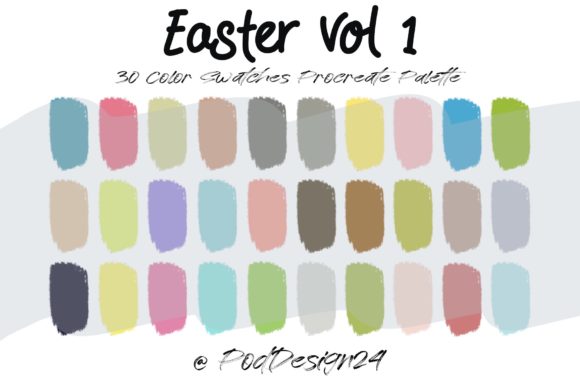
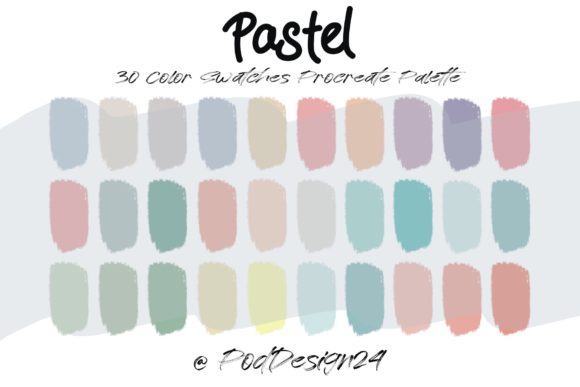
When you download a high-quality palette, such as one containing thirty distinct colors, you are receiving a tested combination of hues. This typically includes a range of warm tones like peach, blush, and buttercream, alongside cool tones such as lavender, sky blue, and sage. The inclusion of neutral pastels, like soft grays and creams, provides essential grounding elements that prevent the artwork from becoming overly sweet or chaotic. This balance is crucial for professional-looking results, especially in commercial illustration where brand consistency matters.
Streamlining Your Workflow with Instant Access
One of the primary benefits of using a dedicated swatch file is the immediate integration into your creative environment. When you purchase or download a Procreate Color Palette Pastel, you typically receive a ZIP file. Inside this archive, you will find the specific swatch file compatible with Procreate. The process is designed to be straightforward: after downloading, you unzip the file and open it directly within the Procreate app. Your new palette will automatically appear in your library, ready for use.
This seamless installation process saves valuable time. Instead of manually inputting hex codes or trying to replicate colors from reference images, you have instant access to thirty carefully selected shades. This efficiency allows you to focus on composition, lighting, and storytelling rather than technical color setup. For freelancers and agency artists who work under tight deadlines, this reduction in setup time can significantly impact productivity and overall project turnaround.
Practical Applications for Digital Artists
The versatility of a pastel palette extends across various genres of digital art. Here are several ways artists can leverage these tools effectively:
- Character Design: Pastel colors are ideal for creating approachable, friendly characters. They work exceptionally well for children’s book illustrations, where soft tones help create a safe and inviting atmosphere. Using a consistent palette ensures that different characters look like they belong in the same world.
- UI and Web Design Mockups: Modern web design often favors soft, minimalist aesthetics. A Procreate Color Palette Pastel can be used to prototype app interfaces, ensuring that buttons, backgrounds, and text elements have sufficient contrast while maintaining a modern, clean look.
- Pattern and Surface Design: For artists creating textiles, wallpapers, or stationery, pastel palettes provide the subtle variation needed for repeating patterns. The thirty-color range allows for enough diversity to create depth without overwhelming the viewer.
- Social Media Content: Instagram and Pinterest thrive on cohesive feeds. Using a standardized pastel palette for quotes, backgrounds, and highlights helps establish a recognizable brand identity that attracts followers seeking calming or aesthetically pleasing content.
Ensuring Compatibility and Successful Implementation
Before integrating any new digital asset into your workflow, it is essential to verify compatibility. While Procreate is robust, ensuring that your software version supports the latest swatch formats is a prudent step. Most modern versions of Procreate handle standard swatch files effortlessly, but keeping your app updated ensures you avoid any potential glitches during import.
Annotation: Please be sure the files listed above will work with your machine and software. This means checking that your iPad operating system is up to date and that you have the necessary applications to unzip the downloaded file before importing it into Procreate. If you encounter issues opening the ZIP file, consider using a file management app on your iPad to extract the contents first.
Once imported, take time to explore the thirty colors provided. Do not limit yourself to using them in isolation. Experiment with blending modes and opacity settings to see how these pastels interact with your favorite brushes. Some pastel shades may appear differently depending on the brush texture and the background color. Testing these interactions early in your process will help you understand the full potential of your new palette.
Tailoring the Approach to Your Artistic Style
Different artists will approach a Procreate Color Palette Pastel in unique ways. Beginners might use the palette as a learning tool, studying how the colors harmonize and applying them directly to understand color relationships. Intermediate artists might use the palette as a base, tweaking individual hues slightly to better suit specific lighting conditions in their scenes. Advanced professionals often use curated palettes to maintain consistency across large teams or multiple projects, ensuring that every piece adheres to a specific visual language.
For those who prefer a more organic feel, consider using the pastel swatches as underpainting layers. By laying down broad strokes of these soft colors first, you create a unified tone that influences the subsequent layers. This technique is particularly effective in landscape painting, where atmospheric perspective relies on subtle shifts in color temperature and saturation.
Maximizing the Potential of Your Thirty-Color Set
Having thirty colors might seem like a limitation compared to the millions available in the digital spectrum, but this constraint is actually a creative advantage. It forces you to make deliberate choices and encourages mastery over a smaller set of tools. To get the most out of your Procreate Color Palette Pastel, try creating a cheat sheet or reference grid within Procreate. This visual guide allows you to quickly identify which colors serve as your primaries, secondaries, and accents.
Additionally, consider how these pastels interact with line art. Traditional black ink can sometimes feel too harsh against soft pastel backgrounds. Experiment with using dark brown, deep purple, or navy lines from your palette to create a softer, more integrated look. This small adjustment can significantly enhance the cohesion of your final piece.
In conclusion, investing in a high-quality Procreate Color Palette Pastel is a strategic move for any digital artist looking to refine their workflow and enhance their visual output. By providing a harmonious, ready-to-use set of thirty colors, these palettes remove the friction of color selection and allow you to focus on what truly matters: creating beautiful, meaningful art. Whether you are illustrating a children's book, designing a brand identity, or simply exploring new styles, this resource offers the flexibility and reliability needed to bring your creative visions to life.