Mastering the Procreate Bewitched Lettering Brush for Digital Calligraphy
Digital lettering has evolved from a niche hobby into a professional standard for designers, illustrators, and content creators. Within this expansive ecosystem, specialized tools play a pivotal role in defining an artist’s workflow and aesthetic. One such tool that has garnered attention for its unique visual output is the Procreate Bewitched Lettering Brush. Designed specifically for the iPad environment, this hand-created digital asset offers a distinct approach to typography, blending pressure sensitivity with atmospheric texture. For artists evaluating their toolkit, understanding the specific mechanics, strengths, and limitations of this brush is essential before integrating it into a professional pipeline.
Defining the Aesthetic and Technical Profile
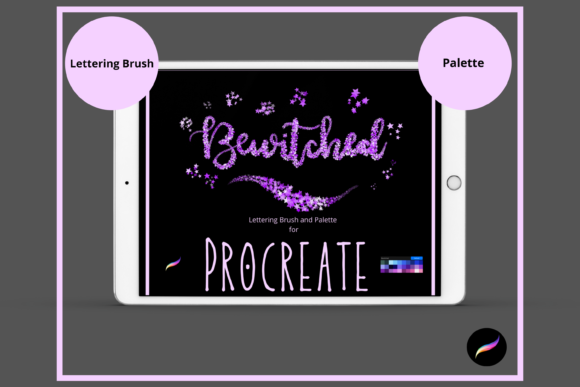
The core appeal of the Bewitched brush lies in its ability to simulate a glimmering, starry effect within letterforms. Unlike standard round brushes that produce uniform strokes, this tool introduces a tonal variance that reacts dynamically to input. The brush is engineered to be pressure-sensitive, meaning the intensity of the "glimmer" and the weight of the stroke change based on how firmly the user presses the Apple Pencil against the screen. This feature allows for organic variation, mimicking the natural inconsistencies found in traditional ink or chalk media, but with a magical, celestial twist.
Versatility is another critical component of its design. Users can manipulate the size and opacity sliders to achieve vastly different looks. At lower opacities, the brush creates subtle, ethereal traces suitable for background elements or delicate accents. At full opacity, it delivers bold, statement pieces that stand out prominently. The smooth feel of the brush ensures that long, sweeping curves remain fluid without unexpected jitter or lag, a common concern when using highly textured custom brushes in digital applications.
The Importance of Background Contrast
A significant consideration when using the Procreate Bewitched Lettering Brush is the canvas environment. The brush is explicitly tonal and designed to look great against dark backgrounds. On white or light-colored canvases, the "starry" and glimmering effects may lose their visibility and impact, as the lighter tones blend into the background rather than popping against it. This makes the brush particularly well-suited for projects involving night skies, galaxy themes, dark mode interfaces, or moody, atmospheric compositions. Artists planning to use this tool should prioritize projects where high-contrast, dark substrates are part of the design brief.
Workflow Integration and Customization
Integrating any new brush into an existing workflow requires an understanding of its adjustability. The Bewitched brush allows for post-creation modifications, providing flexibility that static stamps or rigid vectors do not offer. Once lettering is complete, users can employ the move and resize tool to adjust the scale of the text without losing quality, a benefit of vector-like scalability within raster environments when handled correctly. Additionally, the brush resize tool within Procreate allows for real-time adjustments during the drawing process.
For more nuanced control, the strength of the blend ink charge can be altered. By adjusting the opacity slider or experimenting with different blend modes—such as Screen, Add, or Overlay—artists can change how the brush interacts with underlying layers. This capability enables the creation of depth and luminosity, allowing the lettering to appear as if it is emitting light rather than simply sitting on top of the background. However, mastering these settings requires experimentation, as each blend mode will react differently depending on the colors and textures present in the artwork.
Included Resources: The Color Palette
To facilitate immediate use, the brush package typically includes a curated ‘Bewitched’ color palette. This addition is valuable for beginners who may struggle with color theory or selecting hues that complement the brush’s glimmering effect. The palette is designed to harmonize with the brush’s tonal qualities, ensuring that the chosen colors enhance rather than detract from the starry texture. For experienced designers, this palette serves as a starting point that can be expanded upon, offering a cohesive visual language for themed projects.
Technical Requirements and Compatibility Constraints
Before purchasing or downloading the Procreate Bewitched Lettering Brush, it is crucial to verify hardware and software compatibility. This tool is exclusive to the Procreate app and will not function in other digital art platforms such as Adobe Fresco, Clip Studio Paint, or Photoshop. Furthermore, it requires an iPad Pro (or compatible iPad model) and an Apple Pencil. The pressure sensitivity features, which are central to the brush’s performance, rely on the precise input capabilities of the Apple Pencil. Using a finger or a generic stylus will result in a diminished experience, lacking the dynamic range intended by the creator.
The installation process also demands specific technical steps. Users must have a platform to download the files, such as iCloud, and a program capable of unzipping compressed files, like iZip. Once the files are extracted, they must be imported into Procreate within a named folder. While this process is straightforward for tech-savvy users, it may present a slight barrier for those unfamiliar with file management on iOS devices. Understanding these prerequisites helps avoid frustration and ensures a smooth setup experience.
Comparative Analysis: When to Choose This Brush
When evaluating the Bewitched brush against other lettering options, several factors come into play. Standard calligraphy brushes offer clean, predictable lines ideal for corporate branding or formal invitations. In contrast, the Procreate Bewitched Lettering Brush is stylistic and thematic. It is not a general-purpose tool but a specialized asset for specific artistic visions.
- Best Fit: Projects requiring a magical, celestial, or nighttime aesthetic. Ideal for book covers, poster designs, social media graphics with dark themes, and decorative illustrations.
- Tradeoffs: Limited utility on light backgrounds. The textured nature may not suit minimalist or ultra-clean design requirements where legibility and simplicity are paramount.
- Alternatives: For versatile, all-purpose lettering, standard monoline or script brushes may be more appropriate. For vector-based scalability across print and web, Adobe Illustrator tools remain superior, though they lack the natural, hand-drawn feel of Procreate.
Artists should consider whether their project benefits from the organic, textured look of the Bewitched brush. If the goal is to create eye-catching, atmospheric typography that evokes wonder or mystery, this brush is an excellent choice. However, for tasks requiring precise, uniform lettering or light-mode compatibility, other tools within the Procreate library or external software may yield better results.
Decision Factors for Digital Artists
Choosing the right digital brush involves balancing aesthetic desires with practical constraints. The Procreate Bewitched Lettering Brush excels in creating mood and atmosphere. Its pressure sensitivity and blend mode compatibility offer a high degree of creative control, allowing artists to fine-tune the intensity of the glimmer effect. The inclusion of a dedicated color palette further streamlines the creative process, reducing decision fatigue during the initial stages of a project.
However, the reliance on dark backgrounds and specific hardware means it is not a universal solution. Artists working primarily in light-themed designs or those who do not own an Apple Pencil-compatible device should look elsewhere. Additionally, users must be comfortable with the file import process, ensuring they have the necessary apps to manage downloaded assets.
Ultimately, the value of this brush lies in its specialization. It fills a niche for celestial and magical typography, offering a polished, professional look that would otherwise require complex manual layering and effect application. For designers frequently working within these themes, the Bewitched brush represents a time-saving, high-quality resource. For others, it serves as an inspiring example of how specialized digital tools can expand the expressive potential of lettering art.
By carefully considering the project requirements, hardware capabilities, and aesthetic goals, artists can make an informed decision about whether the Procreate Bewitched Lettering Brush aligns with their creative needs. As with any digital tool, mastery comes through practice and experimentation, leveraging the brush’s unique features to create compelling, visually striking work.