Procreate Color Palette Galaxy: A Cosmic Guide
Digital illustration has evolved from a niche hobby into a robust professional industry, and at the heart of this shift is the iPad app Procreate. While brushes and techniques often steal the spotlight, color theory remains the silent engine driving emotional resonance in art. This is where Procreate Color Palette Galaxy steps in, offering more than just a collection of hues; it provides a curated atmospheric experience for creators who want their work to feel expansive, mysterious, and deeply engaging.
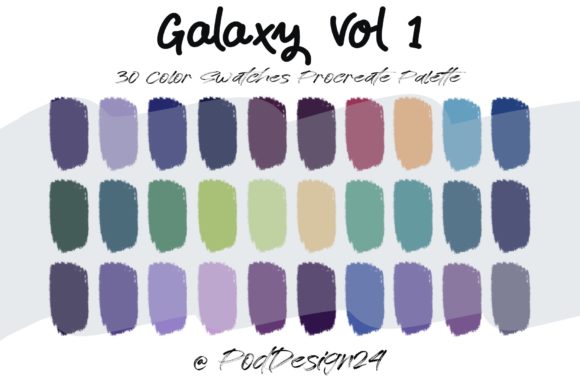
For designers, marketers, and hobbyists alike, selecting the right colors can be the difference between a piece that blends into the background and one that commands attention. The Procreate Color Palette Galaxy is designed to solve the common paralysis of choice by providing a harmonious set of thirty distinct colors that mimic the depth and vibrancy of outer space. When you download this file, you receive a ZIP archive containing a specialized swatch file. Once imported, your Procreate library instantly gains access to a spectrum that ranges from deep, void-like blacks and navies to shimmering nebula purples, electric cyans, and stellar whites.
Visual Personality and Artistic Appeal
The visual characteristics of this palette are rooted in contrast and luminosity. Unlike flat, primary-colored sets, the Procreate Color Palette Galaxy leans into complex gradients and tonal variations. It captures the essence of cosmic phenomena—think of the swirling dust of a supernova or the cold, crisp light of a distant star. This gives the palette a personality that is both modern and timeless, suitable for projects that require a sense of wonder or high-tech sophistication.
From a branding perspective, these colors convey innovation and creativity. The inclusion of deep indigos and vibrant magentas allows for dynamic brand identity development, particularly for tech startups, gaming studios, or creative agencies looking to project a forward-thinking image. The palette’s structure supports visual hierarchy naturally; the darker tones serve as excellent backgrounds or grounding elements, while the brighter accents draw the eye to key focal points. This inherent balance makes it an invaluable asset for anyone involved in digital design or social media graphics, where stopping the scroll is paramount.
Practical Applications Across Industries
While the name suggests a celestial theme, the utility of this palette extends far beyond space-themed illustrations. Its versatility makes it a powerful tool across various creative and commercial sectors. For instance, in web design, the darker shades can create immersive dark-mode interfaces that reduce eye strain while maintaining high aesthetic appeal. The lighter, glowing accents work perfectly for call-to-action buttons or interactive elements, ensuring they stand out without clashing with the overall design.
In the realm of packaging design, particularly for products targeting younger demographics or the beauty industry, these colors can evoke a sense of luxury and mystery. Imagine a skincare line using the soft lavender and deep blue tones to suggest night-time restoration, or a beverage brand using the electric cyan to signal energy and refreshment. The palette’s ability to transition seamlessly from subtle to bold allows for consistent application across different materials, from matte cardboard boxes to glossy labels.
For content creators and bloggers, the Procreate Color Palette Galaxy offers a cohesive look for thumbnails, story highlights, and banner images. Consistency in color usage helps build recognition among audiences. By sticking to this defined set of thirty colors, creators can ensure that their visual content remains distinct and recognizable, fostering a stronger connection with their followers. Whether you are designing an eBook cover, creating editorial design layouts for a digital magazine, or crafting intricate digital paintings, this palette provides the foundational tones needed to maintain professional consistency.
Enhancing Readability and Brand Perception
Color is not merely decorative; it is functional. The strategic use of the Procreate Color Palette Galaxy can significantly influence readability and user experience. High-contrast combinations, such as pairing the deepest navy with the brightest white or pale yellow, ensure that text remains legible even on small screens. This is crucial for logo design and typography-heavy projects where clarity is non-negotiable.
Moreover, the psychological impact of these colors cannot be overstated. Blues and purples are often associated with trust, wisdom, and creativity. By integrating these hues into your commercial font selections and overall layout, you subtly communicate reliability and imagination to your audience. This enhances brand perception, making your business appear more established and thoughtful. For entrepreneurs and small business owners, this means that your visual assets do more than just look good—they work to build credibility and engage customers on a subconscious level.
Implementation and Best Practices
Getting started with the Procreate Color Palette Galaxy is straightforward, but maximizing its potential requires a bit of strategic planning. Upon purchase, you will receive a ZIP file. It is essential to ensure that your device and software are compatible before proceeding. Once downloaded, extract the file and open it within Procreate. The palette will automatically populate your swatch library, ready for immediate use.
To make the most of these thirty colors, consider the following practical steps:
- Evaluate Project Fit: Before diving in, assess whether the cosmic vibe aligns with your project’s goals. While versatile, the palette shines in projects that benefit from depth and drama.
- Test Font Pairings: If you are combining these colors with typography, choose fonts that complement the modern, sleek nature of the palette. A clean sans serif font often works well with the futuristic tones, while a delicate script font can add a touch of elegance against the darker backgrounds.
- Check Readability: Always test your color combinations on actual devices. What looks good on a calibrated monitor might appear differently on a smartphone screen. Ensure there is sufficient contrast between text and background.
- Review Licensing: Understand the terms of use for the palette. Most digital assets come with specific guidelines for personal and commercial use. Ensure you are compliant, especially if you are creating products for sale.
When working with such a vibrant set, restraint is often key. You do not need to use all thirty colors in a single piece. Instead, select a primary trio—one dominant color, one secondary support, and one accent. This approach prevents visual clutter and maintains a polished, professional look. For example, use a deep purple as your base, a mid-tone blue for secondary elements, and a bright cyan for highlights. This method creates a cohesive narrative within your design, guiding the viewer’s eye exactly where you want it to go.
Ultimately, the Procreate Color Palette Galaxy is more than a set of digital swatches; it is a toolkit for storytelling. By understanding its visual language and applying it with intention, you can elevate your creative projects, strengthen your brand identity, and connect more deeply with your audience. Whether you are a seasoned designer or a passionate hobbyist, this palette offers the cosmic inspiration needed to bring your visions to life with clarity and impact.