Unlocking Creative Potential with Procreate Brush Stamps: A Guide to Gnome Summer by Pakka Design Studio
In the rapidly evolving landscape of digital art, efficiency and creativity often walk hand in hand. For artists, designers, and hobbyists using the iPad, Procreate has become the gold standard for illustration. However, even the most skilled artists can benefit from tools that streamline their workflow. This is where specialized assets, such as the Gnome Summer brush stamp set by Pakka Design Studio, come into play. These digital resources are not just shortcuts; they are foundational elements that allow creators to build complex, whimsical scenes with ease and precision.
Understanding how to leverage brush stamps can transform your design process, whether you are creating greeting cards, social media graphics, or personal art projects. This article explores the significance of these tools, how they integrate into modern digital workflows, and why the Gnome Summer collection is a valuable addition to your creative toolkit.
The Role of Brush Stamps in Modern Digital Art
To appreciate the value of a product like the Gnome Summer set, it is essential to understand what brush stamps are and why they matter. In traditional painting, a stamp might be a physical rubber tool dipped in ink. In the digital realm, specifically within Procreate, a brush stamp is a pre-designed image or shape that acts as a "brush tip." Every time you tap or drag your stylus across the canvas, the application replicates that shape.
This technology serves several critical purposes in contemporary design:
- Efficiency: Drawing intricate details like gnome hats, shoes, or facial features repeatedly can be time-consuming. Brush stamps allow you to place these elements instantly.
- Consistency: When creating a series of characters or a pattern, maintaining a consistent style is crucial. Pre-made stamps ensure that every nose, mustache, or hand looks uniform in style and proportion.
- Accessibility: Not everyone has advanced drawing skills. Brush stamps lower the barrier to entry, allowing beginners to create professional-looking compositions without needing to master anatomical drawing or perspective for every small element.
For businesses and educators, this means faster turnaround times for visual content. For individual creators, it means more time spent on composition and color theory rather than repetitive line work.
Why Choose Pakka Design Studio?
The market is flooded with digital assets, but quality varies significantly. Pakka Design Studio has carved out a niche by providing high-quality, user-friendly resources tailored specifically for the Procreate ecosystem. Their approach focuses on usability and aesthetic appeal. The Gnome Summer collection is a prime example of this philosophy. It is not merely a random assortment of images; it is a curated kit designed to help users construct cohesive summer-themed gnome characters.
By choosing a reputable designer, you ensure that the files are optimized for performance. Poorly optimized brushes can lag on an iPad, disrupting the creative flow. Pakka Design Studio ensures that their 46 brush stamps are lightweight yet high-resolution, providing a smooth experience on the latest versions of Procreate.
Exploring the Gnome Summer Collection
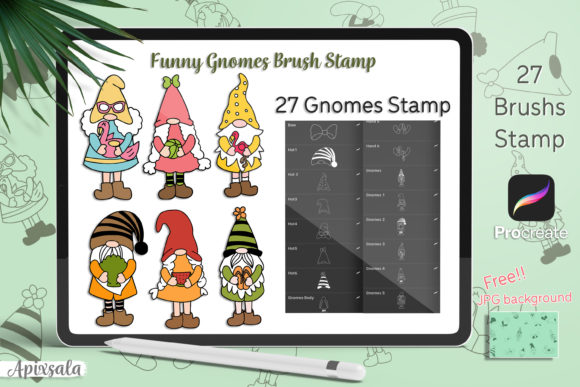
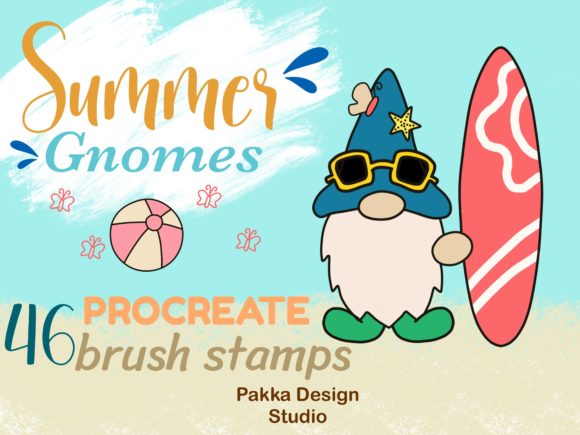
The Gnome Summer set is designed with versatility in mind. It allows users to mix and match elements to create unique characters. The collection includes 46 distinct brush stamps, categorized into essential components of gnome anatomy and attire. Let’s break down what is included and how each element contributes to your designs.
- Noses: The centerpiece of any gnome face. These stamps likely vary in shape and size, allowing for different expressions and character personalities.
- Hats: Gnomes are iconic for their headwear. Summer-themed hats might include floral patterns, lighter fabrics, or vibrant colors suitable for the season.
- Mustaches: Facial hair adds character and age to your gnomes. Various styles enable you to differentiate between characters easily.
- Hands: Often difficult to draw, pre-stamped hands allow your gnomes to hold flowers, tools, or simply rest at their sides naturally.
- Shoes: Completing the look, these stamps ensure your gnomes are grounded in your scene, with footwear that matches the summer aesthetic.
This modular approach encourages experimentation. You are not limited to one specific look. By combining a large nose with a small hat, or a bushy mustache with delicate hands, you can generate hundreds of unique combinations from a single file download.
Technical Requirements and Installation Guide
One of the most appealing aspects of digital assets is their ease of use. However, technical compatibility is key to a frustration-free experience. The Gnome Summer set is designed specifically for the iPad ecosystem. Here is what you need to know before you begin.
File Requirements and Compatibility
To use this brush set effectively, ensure your setup meets the following criteria:
- Device: An iPad capable of running the latest version of Procreate. While older models may work, performance is best on newer hardware.
- Software: The Procreate application must be updated to its latest version. Older versions may not support newer brush engine features or file formats.
- File Format: The download comes as an All-in-One Zip file. This compressed format keeps the 46 individual brush files organized and reduces download size.
Step-by-Step Installation Process
Installing Procreate brushes is straightforward, but first-time users might find the process unclear. Follow these steps to integrate the Gnome Summer stamps into your library:
- Download the File: Purchase and download the Zip file from the provider’s website or marketplace.
- Unzip the Archive: Locate the downloaded file in your iPad’s Files app. Tap on the Zip file to automatically extract its contents. You should now see the individual
.brushsetor.brushfiles. - Import to Procreate:
- Open Procreate and create a new canvas or open an existing one.
- Tap on the Brush Library icon (the paintbrush symbol).
- Depending on your iOS version, you can either tap the "+" sign to import or simply tap on the extracted brush file in the Files app and select "Open in Procreate."
- If using the "Open in" method, Procreate will automatically install the brushes into a new folder at the top of your brush list.
- Verify Installation: Scroll through your brush library to find the new folder, likely named "Gnome Summer" or similar. Test a few stamps to ensure they appear correctly on the canvas.
Note: If the brushes do not appear immediately, restart the Procreate app. This refreshes the library and ensures all new assets are loaded.
Practical Applications and Creative Ideas
Once installed, the possibilities are endless. The Gnome Summer set is not limited to static illustrations. Here are several ways to incorporate these stamps into your daily creative practice:
Seasonal Greeting Cards: Create personalized summer greetings for friends and family. Combine the gnome stamps with hand-lettered messages and watercolor backgrounds for a heartfelt touch.
Social Media Content: Design engaging posts for Instagram or Pinterest. Gnomes are highly shareable content. Use the stamps to create quick memes, seasonal announcements, or decorative borders for your photos.
Educational Materials: Teachers and parents can use these stamps to create fun worksheets or storytelling aids. Children can enjoy coloring in the outlines created by the stamps, fostering both digital and traditional artistic skills.
Product Design: For those selling print-on-demand products, these stamps can be used to design patterns for textiles, mugs, or stickers. The modular nature of the set allows for seamless pattern creation.
Conclusion
The Gnome Summer brush stamp set by Pakka Design Studio represents more than just a collection of digital images. It is a tool that empowers creators to work smarter, not harder. By understanding the mechanics of brush stamps and leveraging high-quality assets, you can elevate your digital art game. Whether you are a seasoned illustrator looking to speed up your workflow or a beginner eager to create charming characters, this set offers the flexibility and quality needed to bring your summer visions to life.
Remember, the key to mastering these tools lies in experimentation. Mix the noses, swap the hats, and play with the colors. With the right resources and a bit of creativity, your iPad becomes a portal to endless artistic possibilities. Download, unzip, and start creating today.