Unlocking Creative Flow with the Rainbow Procreate Brush
Digital illustration has evolved far beyond simple line art and flat colors. For artists, designers, and hobbyists using the iPad, the desire for tools that mimic the unpredictability and joy of traditional media is constant. This is where the Rainbow Procreate Brush steps in. It is not just another texture pack or standard ink tool; it is a dynamic instrument designed to respond to the physical pressure of your Apple Pencil or stylus. As you press harder or lighter, the brush shifts through a spectrum of colors, creating an immediate, vibrant effect that feels almost magical to use.
Understanding how this tool works is the first step to integrating it into your workflow. Unlike static brushes that maintain a single hue regardless of input, this brush utilizes Procreate’s advanced engine to map color changes to pressure sensitivity. This means your hand movements directly dictate the visual outcome. A light touch might yield soft pastels, while a firm stroke bursts into deep, saturated tones. This interactivity transforms the act of drawing from a technical process into a playful exploration, making it an invaluable asset for creators who want to break out of rigid digital habits.
Why Pressure-Sensitive Color Changes Matter
The primary appeal of the Rainbow Procreate Brush lies in its ability to add depth and interest without complex layering. In traditional digital painting, achieving a multi-colored gradient often requires selecting multiple colors, switching brushes, or manually blending layers. This can interrupt creative flow, especially when you are in a state of rapid ideation. With this brush, the variation happens in real-time. You draw a single line, and it carries a natural transition of hues that mimics the way light hits a prism or how oil paints mix on a canvas.
This feature is particularly useful for artists who struggle with "blank canvas syndrome." The immediate visual feedback provides a dopamine hit that encourages experimentation. When you know that every stroke will produce something unique and colorful, the fear of making a mistake diminishes. You are no longer worried about perfect color placement; instead, you are focused on movement, shape, and composition. This shift in mindset is crucial for maintaining momentum during long creative sessions.
Real-World Applications for Creators and Professionals
While the fun factor is undeniable, the Rainbow Procreate Brush has practical applications across various professional and personal projects. Here is how different users can leverage this tool effectively:
Social Media Content and Marketing
For marketers and content creators, standing out in a crowded feed is essential. Static graphics often get scrolled past, but vibrant, eye-catching visuals stop the thumb. You can use this brush to create dynamic backgrounds for Instagram stories, TikTok covers, or Pinterest pins. A simple abstract swirl created with the rainbow brush can serve as a textured backdrop for text, adding energy without overwhelming the message. It allows small business owners to produce high-quality, custom graphics quickly without needing extensive design software skills.
Digital Journaling and Planning
The rise of digital planning has brought many enthusiasts to Procreate. If you use your iPad for journaling, bullet journals, or habit tracking, this brush adds a personalized touch that standard fonts and stickers cannot match. Use it to highlight key dates, create decorative borders, or add whimsical doodles to your daily logs. The color-shifting property means your highlights never look monotonous. It turns mundane administrative tasks into a creative ritual, making you more likely to stick with your planning routine.
Educational Materials and Presentations
Educators and trainers often look for ways to make digital slides and worksheets more engaging. When explaining concepts that involve spectra, energy, or diversity, the Rainbow Procreate Brush can be a powerful visual aid. Teachers can create custom diagrams where color intensity represents data or importance. For example, in a science lesson about light refraction, drawing with this brush provides an instant, accurate visual representation. It helps students grasp abstract concepts through intuitive, colorful imagery.
Concept Art and Ideation
Concept artists and illustrators often need to brainstorm quickly. During the initial sketching phase, worrying about exact color palettes can slow down the process. Using a rainbow brush allows you to focus on form and lighting values while simultaneously exploring color harmonies. You can quickly sketch out character designs or environment concepts, letting the brush suggest unexpected color combinations. This can lead to serendipitous discoveries that you might not have chosen deliberately, sparking new creative directions.
Who Benefits Most from This Tool?
The versatility of the Rainbow Procreate Brush means it serves a wide audience. Freelance graphic designers can use it to add unique textures to client logos or branding materials, offering a bespoke element that sets their work apart. Hobbyists and weekend warriors find it accessible because it requires no technical setup—just install and draw. Even children and beginners benefit from the immediate gratification it provides, encouraging them to keep practicing their digital motor skills.
For entrepreneurs, this tool can be part of a broader strategy to humanize their brand. Hand-drawn elements convey authenticity and warmth. By incorporating strokes from this brush into email headers, website banners, or product packaging designs, businesses can project a friendly, approachable image. It bridges the gap between polished corporate aesthetics and personal connection.
Considerations Before You Start
While the tool is user-friendly, there are a few factors to consider to get the best results. First, understand that the effect is dependent on your hardware. The responsiveness of the Rainbow Procreate Brush relies heavily on the pressure sensitivity of your stylus. If you are using an older generation Apple Pencil or a third-party stylus with limited pressure levels, the color transitions may appear less smooth. Ensuring your device is calibrated correctly within Procreate settings is crucial for optimal performance.
Second, consider the context of your project. While the rainbow effect is striking, it can be overwhelming if overused. It works best as an accent rather than the primary element in serious, corporate, or minimalist designs. Use it to draw attention to specific areas or to add flair to casual projects. Knowing when to restrain its use is just as important as knowing how to apply it.
Finally, think about your output format. If you are designing for print, ensure that the vibrant digital colors translate well to CMYK profiles. Screen colors are often more saturated than printed ink, so test your designs if they are intended for physical products like stickers, posters, or merchandise.
Integrating the Brush into Your Workflow
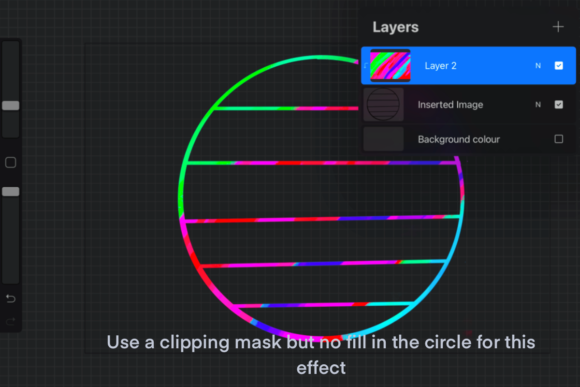
To maximize the potential of the Rainbow Procreate Brush, try combining it with other Procreate features. Use clipping masks to contain the colorful strokes within specific shapes, allowing for controlled chaos. Experiment with blending modes like "Overlay" or "Soft Light" to integrate the rainbow effects subtly into existing artwork. You can also adjust the opacity and flow settings of the brush itself to fine-tune the intensity of the color shifts.
Practice makes perfect. Spend time doing simple exercises, such as drawing circles, lines, and shading gradients, to understand how much pressure yields which colors. This muscle memory will allow you to wield the tool instinctively during complex projects. Over time, you will develop a sense of how to manipulate the brush to achieve both subtle nuances and bold statements.
In conclusion, the Rainbow Procreate Brush is more than a novelty; it is a versatile tool that enhances creativity, efficiency, and visual appeal. Whether you are a professional designer looking to add unique textures, an educator creating engaging materials, or a hobbyist seeking joy in your daily practice, this brush offers a straightforward way to elevate your digital art. By understanding its mechanics and applying it thoughtfully, you can unlock new dimensions in your creative work.