Unlocking Texture and Depth with Grain Artistic Brushes for Procreate
Digital art has come a long way from the sterile, perfectly smooth lines of early vector graphics. Today, the most compelling digital illustrations are those that breathe, possessing the tactile warmth and imperfection of traditional media. This is where Grain Artistic Brushes for Procreate become an essential tool in your creative arsenal. These brushes are not just about adding noise; they are about injecting soul, history, and physical presence into your work. Whether you are a seasoned illustrator looking to break out of a creative rut or a hobbyist wanting to elevate your journaling, understanding how to leverage these textured tools can fundamentally change your workflow and final output.
Beyond the Default: Why Texture Matters in Digital Illustration
The default brushes in Procreate are excellent for precision, but they often lack character. When you start a new piece, the canvas is infinitely white and clean. While this offers freedom, it can also feel intimidating and artificial. Grain brushes introduce immediate visual interest. They mimic the behavior of charcoal on rough paper, ink on newsprint, or paint on canvas. This "grunge wear" effect helps ground your digital creations in reality, making them feel more approachable and human.
Using Grain Artistic Brushes for Procreate allows you to bypass the tedious process of manually adding texture overlays in post-production. Instead, the texture is built into the stroke itself. This means every line you draw carries weight and variation. It creates a dynamic interplay between positive and negative space, allowing backgrounds to feel atmospheric rather than flat. For artists who struggle with making their digital work look "too digital," these brushes provide an instant bridge to organic aesthetics.
Real-World Applications Across Industries
The versatility of this brush set means it is not limited to a single style or industry. Different professionals can harness these 15 unique brushes to solve specific visual problems.
Editorial and Concept Art
In editorial illustration, speed and mood are paramount. Editors often need artwork that conveys a specific tone—nostalgia, grit, urgency, or warmth—within a tight deadline. Grain brushes excel here because they establish mood instantly. A concept artist might use a heavy grain brush to sketch out environment ideas, capturing the rough atmosphere of a dystopian city or a foggy forest without getting bogged down in details. The halftone textures included in the package are particularly useful for creating retro comic book styles or pop-art influences that are currently trending in modern graphic design.
Branding and Packaging Design
Modern branding is moving away from ultra-minimalism toward designs that feel handcrafted and authentic. Small businesses, especially in the food, beverage, and artisanal sectors, benefit immensely from this aesthetic. Imagine designing a label for a craft coffee bag or a natural skincare product. Using Grain Artistic Brushes for Procreate to create textured backgrounds or hand-lettered logos adds a layer of trust and warmth. It suggests that the product is made with care, by humans, for humans. The ability to combine different brushes allows designers to create complex, layered compositions that stand out on crowded shelves.
Social Media Content Creation
For content creators and influencers, standing out in a feed dominated by polished, high-saturation photos is challenging. Textured graphics offer a refreshing pause for the eye. You can use these brushes to create engaging story templates, quote cards, or promotional graphics that feel less like ads and more like art. The grunge wear effect adds a vintage vibe that resonates well with audiences seeking authenticity. By using the included PNG halftone textures, you can quickly overlay patterns onto photos, creating a cohesive visual identity for your brand without needing advanced Photoshop skills.
Maximizing the Potential of the Brush Set
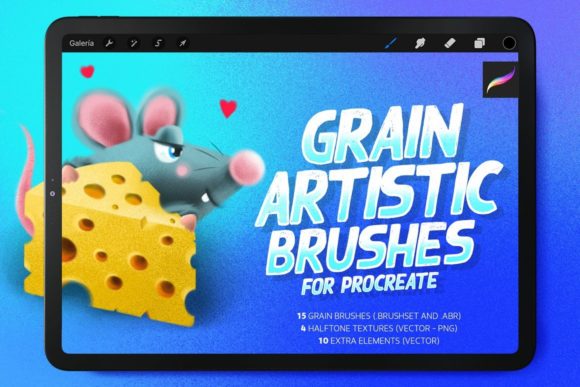
This product includes 15 distinct brushes for Procreate (.brushset) and Photoshop (.ABR), along with 4 halftone texture PNGs. The key to mastering them lies in experimentation and combination. Do not feel restricted to using one brush per piece. In fact, the most interesting results often come from layering.
Start with a broad, heavy grain brush to block in your shadows and mid-tones. This establishes the foundational texture. Then, switch to a finer, more detailed grain brush for your linework and highlights. This contrast creates depth. The halftone PNGs are ideal for adding a secondary layer of complexity. You can place them over your artwork and adjust the blending mode to "Multiply" or "Overlay" to integrate them seamlessly. This technique is perfect for creating backgrounds that look like aged paper or printed fabric.
Because each brush has unique pressure sensitivity and flow settings, take time to test them on a blank canvas. Notice how they react to slow versus fast strokes. Some may build up density quickly, while others remain airy and light. Understanding these nuances allows you to choose the right tool for the specific emotion you want to convey. Your imagination is truly unlimited here; you can use them for abstract backgrounds, textured forms, character shading, or even digital scrapbooking.
Considerations Before You Start
While Grain Artistic Brushes for Procreate are powerful, there are practical considerations to keep in mind to ensure the best results.
- Resolution Matters: Grain and texture effects rely heavily on pixel density. If you are working on a small canvas, the grain may appear too coarse or pixelated. Always start with a high-resolution canvas (at least 300 DPI) to ensure the textures render smoothly and retain their detail when exported.
- Layer Management: Because these brushes add significant visual information, it is easy to clutter your composition. Use layers strategically. Keep your textured backgrounds on separate layers from your main subjects. This allows you to adjust the opacity or blending modes independently, giving you greater control over the final balance of the piece.
- Color Choice: Grain textures interact differently with various colors. Darker colors often show the texture more prominently, while lighter pastels may soften the effect. Experiment with monochromatic schemes to really let the texture shine, or use complementary colors to create vibrant, energetic contrasts.
- Device Performance: Highly textured brushes can be more demanding on your device’s processor, especially if you are using multiple layers with complex blending modes. If you experience lag, try merging visible layers periodically or reducing the number of active texture layers.
Embracing Imperfection
The beauty of Grain Artistic Brushes for Procreate lies in their imperfection. In a world obsessed with high-definition clarity, there is a growing appreciation for the flawed, the worn, and the handmade. These brushes allow you to tap into that sentiment. They encourage you to let go of the need for perfect lines and embrace the happy accidents that occur when digital tools mimic physical media.
Whether you are creating a zine, designing a website header, or illustrating a children’s book, these tools offer a pathway to more expressive and emotionally resonant art. The inclusion of both Procreate and Photoshop formats ensures that you can integrate these textures into any workflow, whether you are strictly mobile-based or working across multiple platforms. The 4 halftone PNGs provide additional flexibility for those who prefer to composite textures in post-production.
Ultimately, the value of this brush set is not just in the files themselves, but in the creative freedom they unlock. They invite you to play, to mix, and to explore. By combining the 15 brushes in unexpected ways, you can develop a unique visual signature that sets your work apart. So, open your app, select a grain brush, and start making marks. Let the texture guide your hand, and see where your imagination takes you.